Your first round in Pronoia
The video loads from YouTube only when you press play. Until then, this page makes no contact with YouTube. youtu.be/aIP7Ahu3BVM
Facilitation (Pronoia)
The previous guide ended with the plan ready and the What now? card suggesting the response phase next. This guide carries on from there. In it you open round 1, invite the panel, follow the responses and the dialogue, close the round and prepare round 2.
The main path is Argument Delphi, Pronoia's signature variation: the panelists rate the theses and justify their ratings, then read each other's justifications and discuss them. The differences in the other variations are at the end of the guide.
A round usually lasts 1–3 weeks. Your own work in it is an hour or two: opening and invitations at the start, a check every few days, and closing at the end.
How a round runs
Everything in this guide is done in the Collection area. Its tabs are Situation, Round management, Invitations, Facilitation, Communication and Responses.
In Argument Delphi, round 1 runs like this:
| Phase | What the panel does | What you do |
|---|---|---|
| 1a Response | rates the theses and justifies the ratings | send invitations, follow responses, remind |
| 1b Dialogue | reads the others' justifications, comments, refines its own | follow the discussion and pick material |
| Pause | does not answer | read the results and build round 2 |
The path also shows the phase 1c Revision marked ↺ during the dialogue. In Argument Delphi the panelists revise their ratings during the dialogue, and there is no separate revision phase.
All transitions are made with the same orange button on the Round management tab. Pronoia does not move the round on by itself, and the deadline does not close the round.
1. Before opening: deadline and visibility
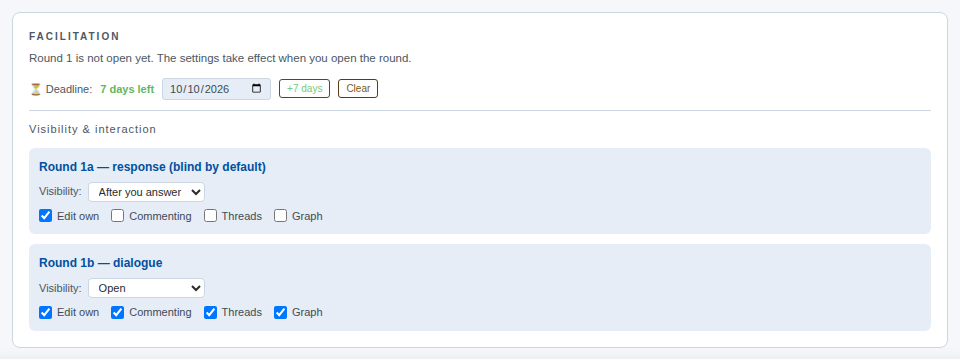
Open Collection › Facilitation. The top line says that round 1 is not open yet and that the settings take effect when you open the round.
- Deadline is a date the panelists see. It does not close the round; it reminds you and the panel. +7 days moves it a week on, Clear removes it.
- Visibility & interaction sets, separately for each phase, what a panelist sees. The template's default suits most studies: in the response phase a panelist sees the others' responses only after giving their own (After you answer), and in the dialogue phase everything is open (Open). The checkboxes (Edit own, Commenting, Threads, Graph) allow or block single actions.
2. Open round 1
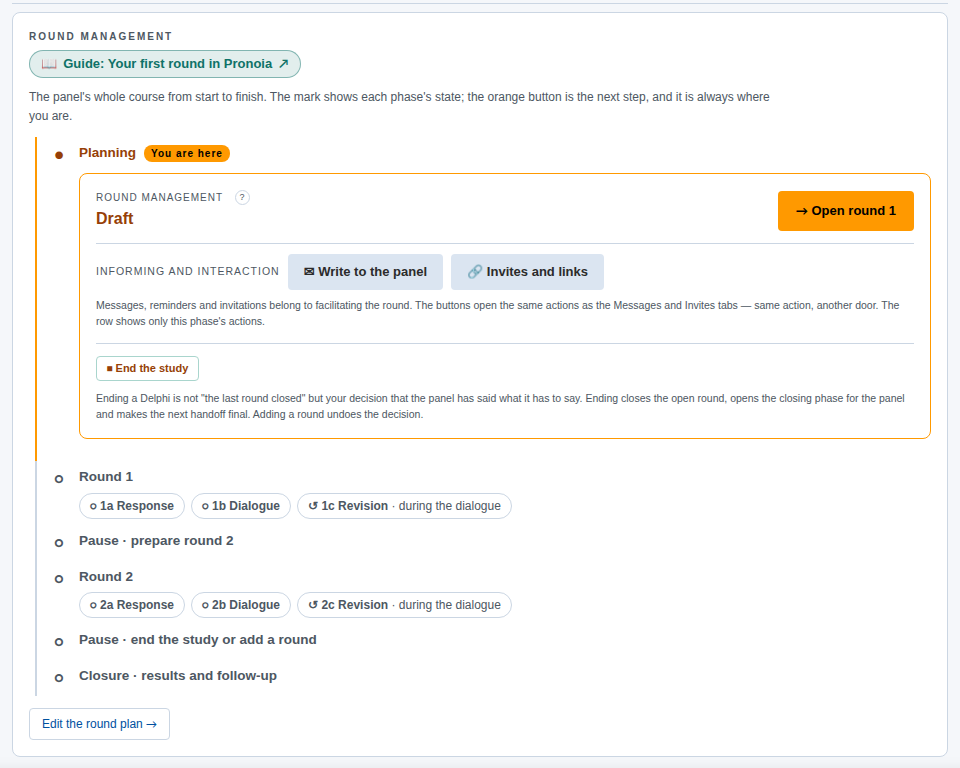
Open Round management. The path shows the whole course from planning to closure, and the You are here label tells you where you are. The orange button is always the next step. Now it is Open round 1.
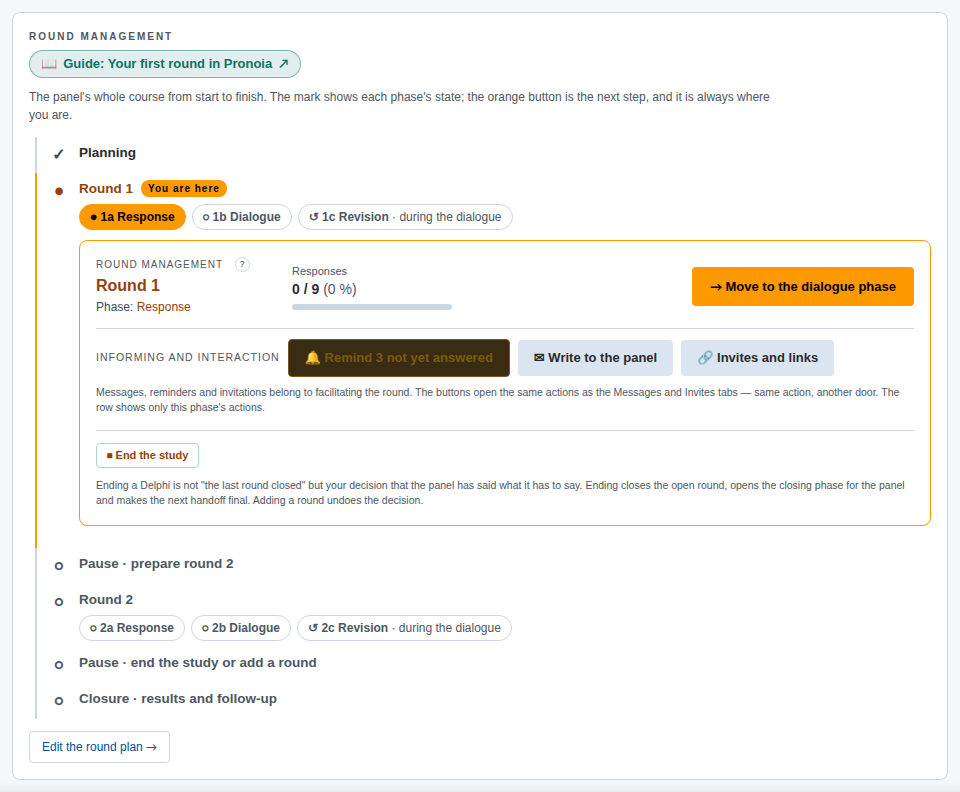
Press Open round 1. The round is now open and the phase is Response. The card shows the number of responses (at first 0 / 9 – three panelists times three theses), and the orange button changes to the next step, Move to the dialogue phase.
Opening does not yet send anything to anyone, and it does not use credits. The panelists hear about it only when the invitations go out.
3. Invite the panel
There are two ways to send the invitation.
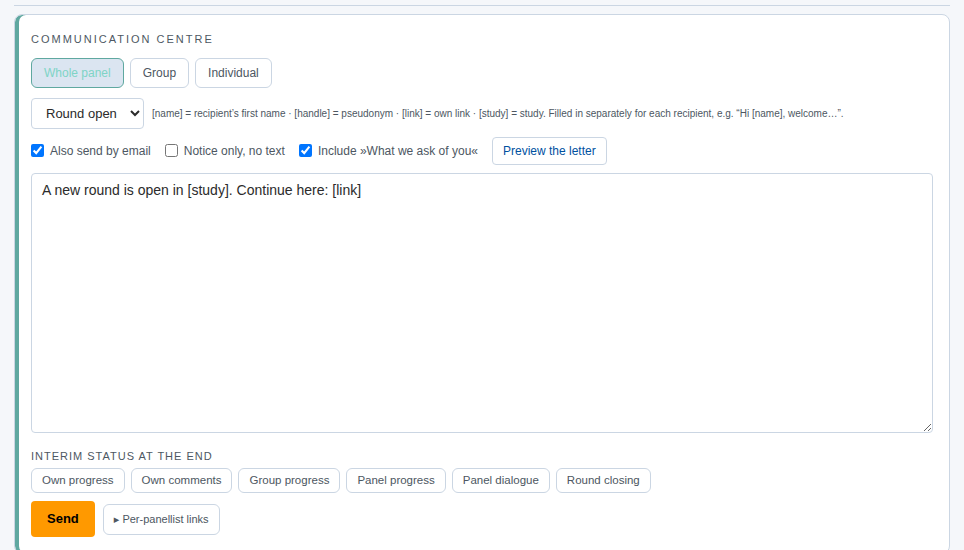
Through Communication (recommended). Open Communication. In the COMMUNICATION CENTRE the recipient is Whole panel. Choose the Round open template. The message comes with ready text and placeholders: [link] is replaced by each panelist's own link and [study] by the study's name.
- Also send by email takes the message to the panelists' inboxes. Without it the message appears only in Pronoia.
- Include »What we ask of you« adds a short description of what is expected of the panelist to the letter.
- Preview the letter shows the letter exactly as it will go out, and sends nothing.
Finally press Send. The delivery report tells you how many inboxes the message reached and who had no address.
The links yourself. If you send the invitations from your own email, open Invitations. There each panelist has a personal link, which Copy copies to the clipboard. The link is personal, so do not send the same link to two people.
4. What the panelist sees
The panelist opens their link and first accepts the consent text (I have read this and I take part). Then they press Start answering → and see the theses one at a time.
In Argument Delphi a scale thesis is rated on two criteria, for example probability and desirability, on a scale of 1–7. A justification is required. In open theses the panelist writes an answer, for example the strongest counter-argument. Skip question leaves the thesis out.
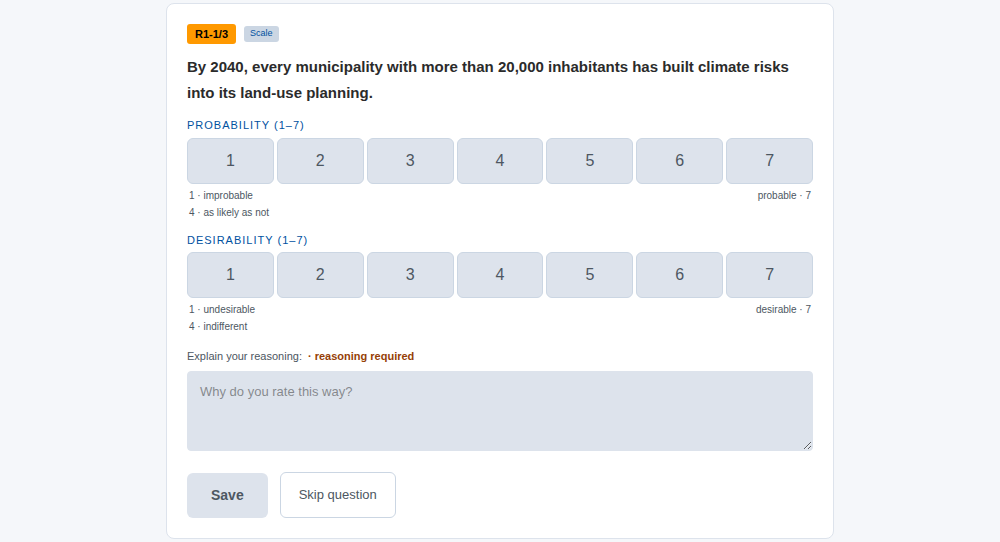
The panelist sees everything under a handle (Vega in the picture), and the other panelists see them only by it. As the facilitator you also see the code (P-01).
5. Follow the responses
Situation shows at a glance where the round stands: the number of responses, justifications, panelists who have answered, comments and visits. What do the figures mean? explains each figure.
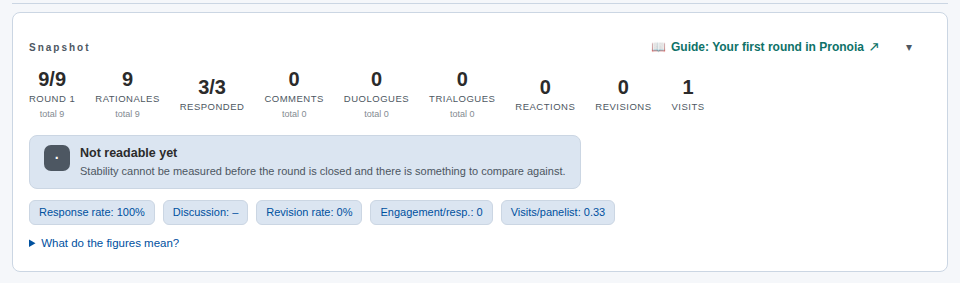
If responses are slow, the button Remind 3 not yet answered on the Round management card sends a reminder to those who have not answered yet (the figure is the number of people who have not answered). The same works on the Communication tab with the Reminder template.
The responses themselves are on the Responses tab, thesis by thesis: who answered, with which values and with which justification.
6. The dialogue phase
When there are enough responses, press Move to the dialogue phase on the Round management tab. If many responses are missing, Pronoia first asks whether you really want to move on.
Dialogue does not close answering: a late panelist can still respond. Now each panelist sees, for every thesis, their own response, the panel's distribution and the others' justifications anonymously. They can comment on the justifications, reply to comments and change their own rating with Edit. In Argument Delphi this is the most important phase of the round: changing a rating in the light of another's justification is the point of the method.
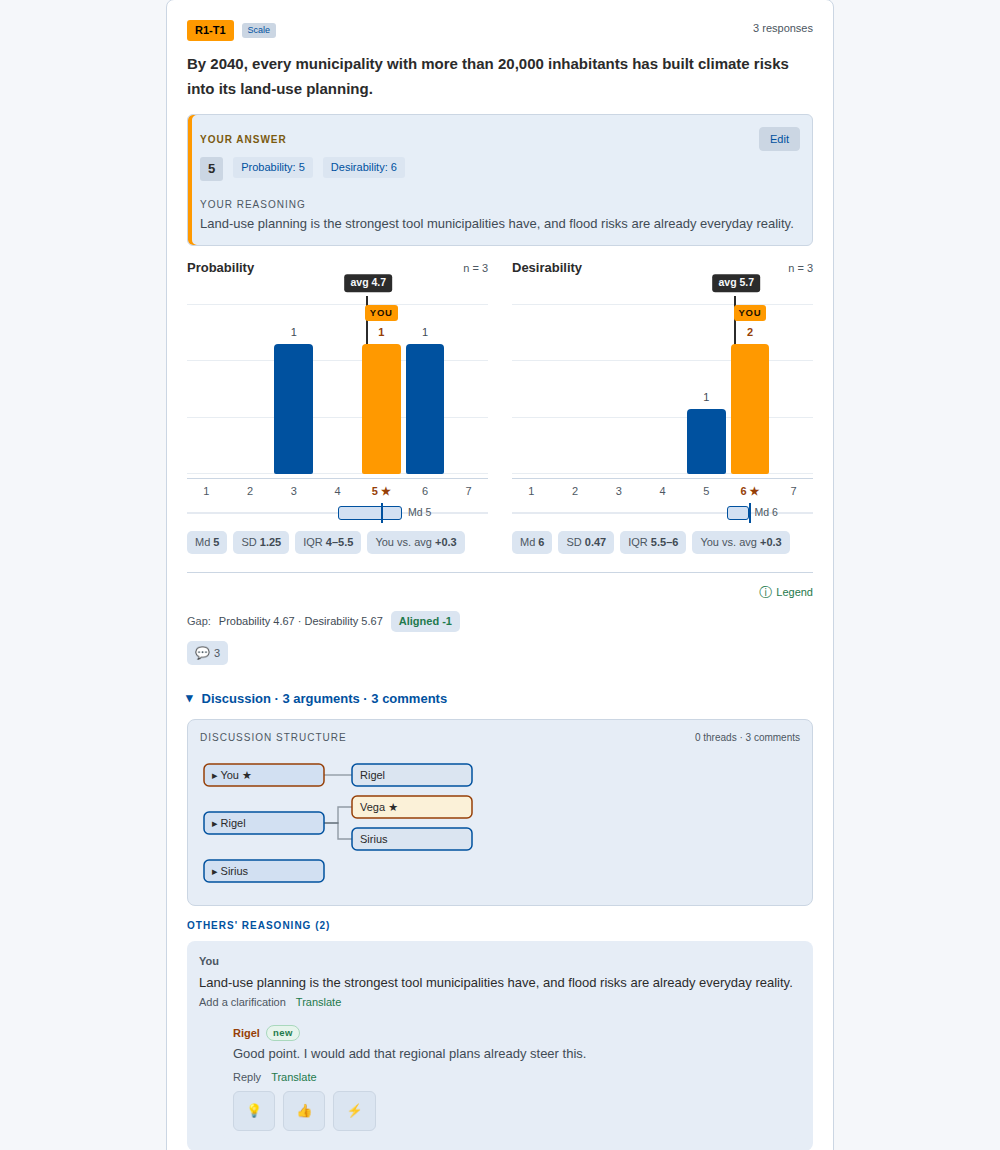
As the facilitator you stay outside the discussion. If you want to tell the panel something, use the Communication tab rather than commenting on justifications yourself.
If you moved the round to dialogue too early, Back to the previous phase restores the response phase. The step back is recorded in the study's log.
7. Pick material for round 2
The Responses tab gathers the round: at the top the numbers of panelists and responses, below that every thesis with its responses.
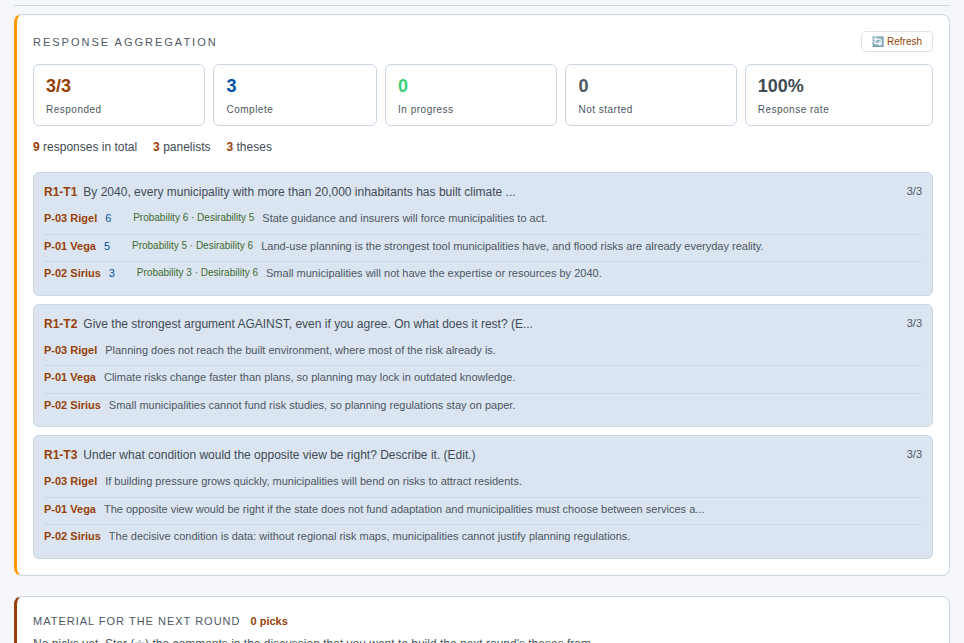
Further down is a timeline, where justifications and comments appear from newest to oldest. When you notice a justification or a comment that could become a round 2 thesis, mark it with a star (☆). The pick goes to MATERIAL FOR THE NEXT ROUND, and in the field Why did you pick this? (only for you) you can write yourself a note.
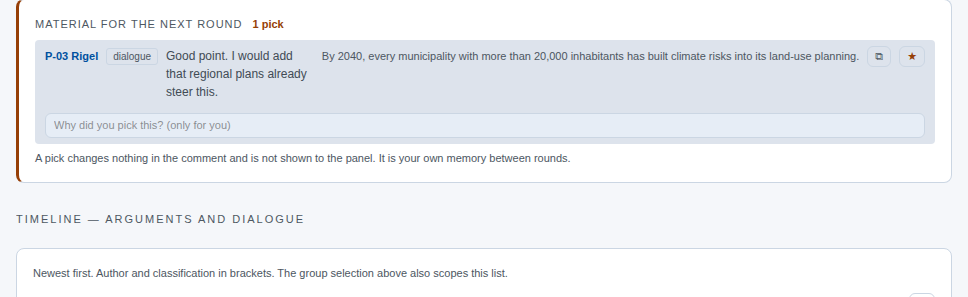
A pick does not change the comment and is not visible to the panel. It is your memory between rounds.
8. Close round 1
When the discussion has quietened down or the deadline has passed, open Round management. In the dialogue phase the card also shows a Disagreement row: on which theses the panel shares a view, where it is scattered and where it splits into two camps. To the summary → takes you to the detailed results.
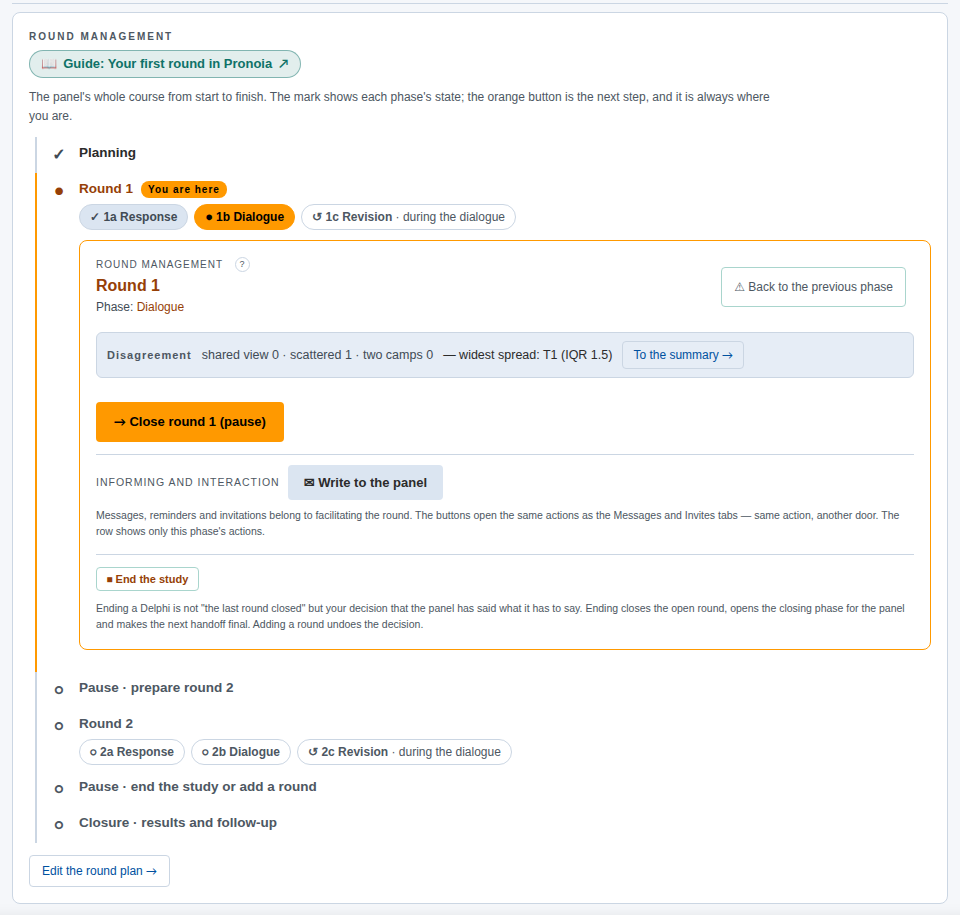
Press Close round 1 (pause). In Argument Delphi the revisions are made during the dialogue, so the round moves from the dialogue straight to the pause. Closing does not end the study. Answering ends, and the material waits for the next round. The study is ended separately with End the study when the time comes.
The What now? card now tells you that you are in the pause and names the next task: an instrument has to be chosen for round 2.
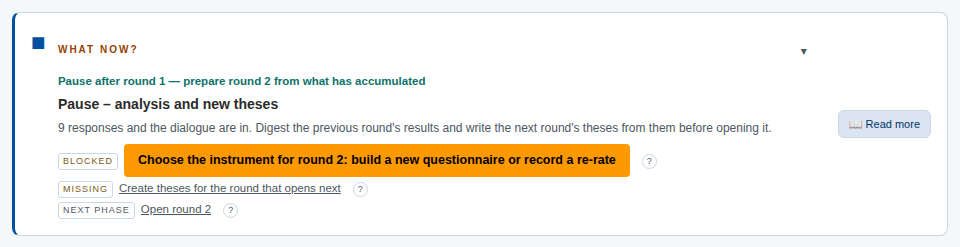
9. Prepare round 2
During the pause there is a card below the tab row: BUILD ROUND 2 — PREPARATION PAUSE. It offers three ways forward:
- Copy round 1 as a starting point brings round 1's theses in as a draft for round 2. You then edit them in the light of what the dialogue taught.
- Start from scratch → takes you to round 2's definition, where you write the new theses. Your picks wait in the Planning area › Theses under SOURCE MATERIAL FOR THE NEW THESIS: select picks, write the thesis, and the selected picks are recorded as its sources.
- Open with the same theses (re-rating) opens round 2 straight away, and the panel rates the same theses again.
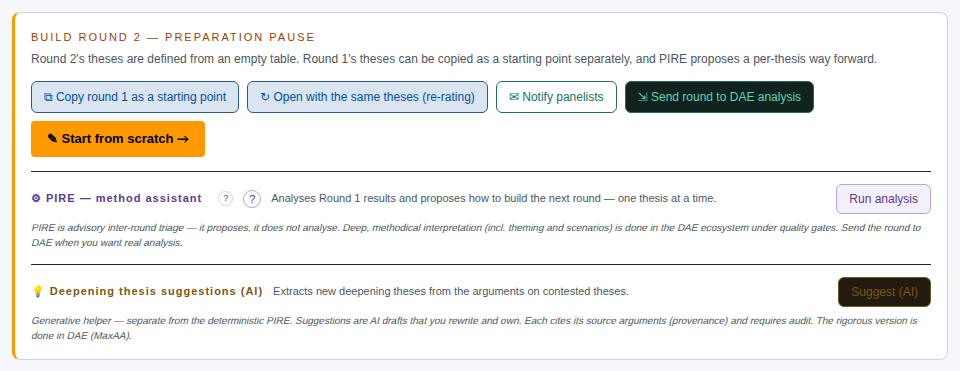
PIRE — method assistant (Run analysis) reads round 1's results and suggests, thesis by thesis, how the next round could be built. It suggests; it does not decide. Notify panelists sends the panel a message in Pronoia that round 1 has been closed and round 2 is being prepared.
When round 2's theses are ready, the round is opened in the same way as round 1, and the steps of this guide repeat.
Other variations
Classic Delphi runs through the same phases as Argument Delphi. The difference is in the aim: Classic Delphi seeks a shared view, so in the pause you read above all on which theses the positions converged and on which they did not. If the round's dialogue phase is switched off in the plan, the orange button after the response phase is directly Close round 1 (pause).
Real-Time Delphi runs a single round in which answering and dialogue are open at the same time. Opening is Open Real-Time Delphi (publish), and a panelist can change their response at any time. Round management has no phases; you close the window with Close the window (pause) once the picture is stable. No round 2 is built.
Barometer Delphi measures the same theses again wave by wave. The round is always open (Always open — a wave is saved, not closed) and is never closed. A wave is saved with Save wave 1 (the wave number changes), and between waves a thesis can be retired and a new one brought in.
Remember
- The round does not move on by itself. The deadline does not close the round, and every transition is your own decision with the orange button.
- Opening invites no one. Invitations go out only from the Communication tab or from your own email.
- Pick at once. Star a promising justification when you notice it. In the pause it is waiting for you.
- The whole process in more detail, including Round 0 and reporting: The facilitator's process, from planning to handover.
- Next: The second round and closing.