Results and reporting
The video loads from YouTube only when you press play. Until then, this page makes no contact with YouTube. youtu.be/OqctLBsDW5g
Facilitation (Pronoia)
This guide carries on where the previous one left off: the rounds are done and the study has been ended or is about to be. In this guide you read the results in Pronoia, make a descriptive results report for the panel and export the material to DAE analysis.
Keep the division of labour in mind. Pronoia describes what the panel answered: distributions, consensus and dissensus, changes of position and the amount of discussion. The figures are computed by rules, without AI. DAE interprets: theming, argument and discourse analysis, scenarios and synthesis are done in the DAE analysis pipeline under quality gates.
Where the results are
The results are in the Analysis area. Its tabs are Summary and, as tools, Statistics & change and Quantitative analysis. At the top of the area you can choose which round's material you look at (Round being viewed R1, R2). The report and the export are in the Reporting area.
1. Summary
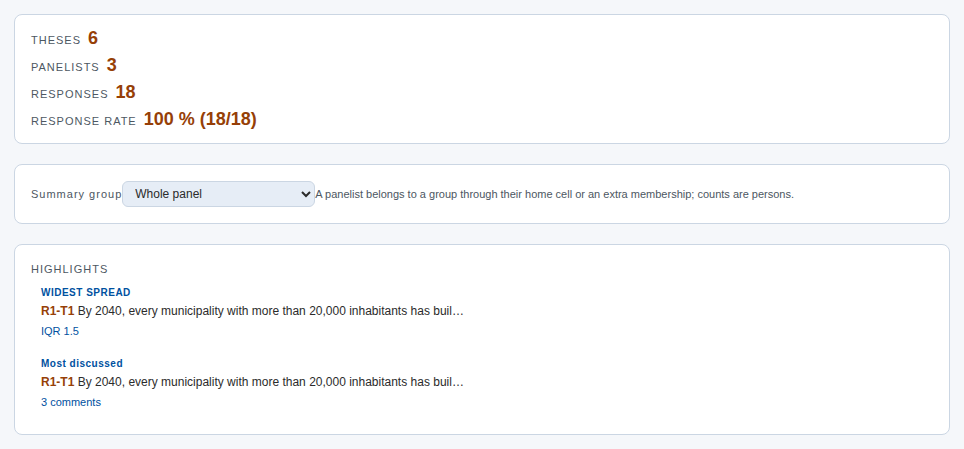
The Summary is the overall picture of the study. Analysis — state of the material at its top tells you whether the material is readable and how much dialogue and how many changes of position it contains. With the choices on the CONTENTS row you show or hide sections.
- Overall picture: the numbers of theses, panelists and responses, and the response rate.
- Highlights: the thesis with the widest spread and the thesis that was discussed most. They are often the most interesting points for the analysis.
- Round movement: the change between rounds. If round 2 has its own new questions, thesis-level movement is not computed, because the questions are different questions. Then development is read from the panel-level figures of Quantitative analysis and from the DAE analysis.
- Per-thesis results: every thesis with its distribution and central values.
AI aids. The Summary's EPISTEMIC 7×3 HEATMAP classifies the justifications by their knowledge base and function. The classification can be done by hand or suggested with AI (AI-suggest coding). AI suggestions are suggestions that you accept or correct. The actual argument analysis is done in DAE.
2. Statistics & change
Statistics & change gathers the rounds' figures thesis by thesis.
- Per-thesis panel stats: respondents, comments, comments on comments, reactions, changes of position and the thesis's class (shared view, scattered or two camps). Theses are named with their round: R1-T1, R2-T1.
- Convergence: consensus and spread (IQR) before and after the changes of position. Rising consensus and narrowing spread mean that the panel is converging. A stable dissensus is an equally valid result.
- Dialogicity: how much the panelists commented on each other's rationales and on those comments.
- Shift directions and revisions: who changed their rating, in which direction and on what grounds.
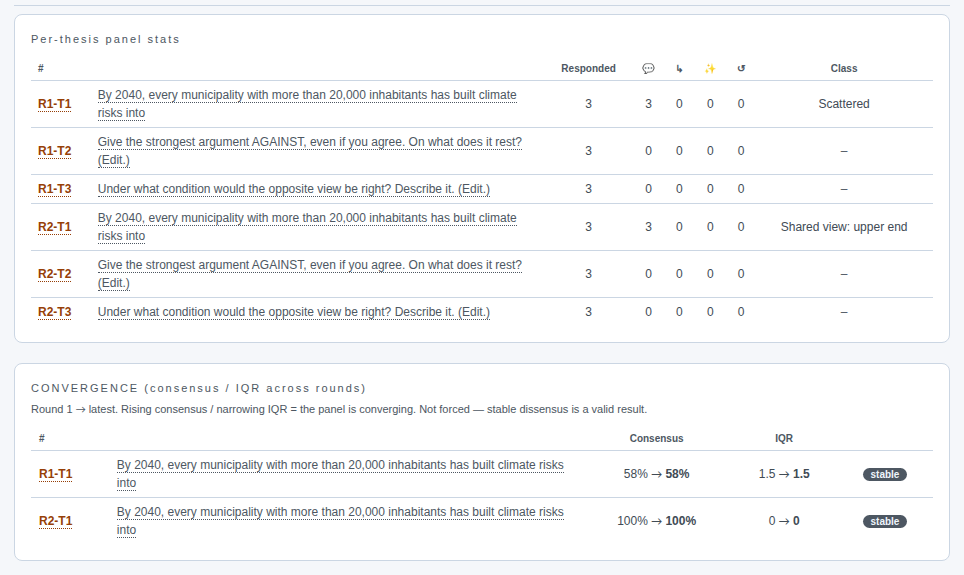
In Argument Delphi the changes of position are made during the dialogue. That makes them the most important part of the material: they show which justification made someone change their position.
3. Quantitative analysis
Quantitative analysis is the basic analysis of the panel's responses. It is computed with the same code as the quantitative stage of the DAE analysis (CP-2), so Pronoia's and DAE's figures are the same for the same material.
- Whose responses: People, AI panelists or Everyone. By default the humans' responses are counted, and humans and AI are not mixed.
- Round: in a multi-round study the analysis shows one round's questions, by default the latest. You can switch the round with the buttons.
- Composition of the survey: how large a share of the round's questions is a shared view, how large a share scattered and how large a share two camps.
- Table: for every question the number of respondents, agreement A, the location on the scale and the class.
- Development by round: each round's own class distribution. The questions of different rounds are usually different questions, so development is followed at panel level: does the share of shared view or of two camps grow. A question-level series is shown only if the same thesis has been rated again. In Argument Delphi the stopping rule is also shown, telling you whether the dissensus is argued and settled.
- Group comparison and Criterion pairs: whether the panel's groups differ from each other and whether two criteria, for example probability and desirability, go together.
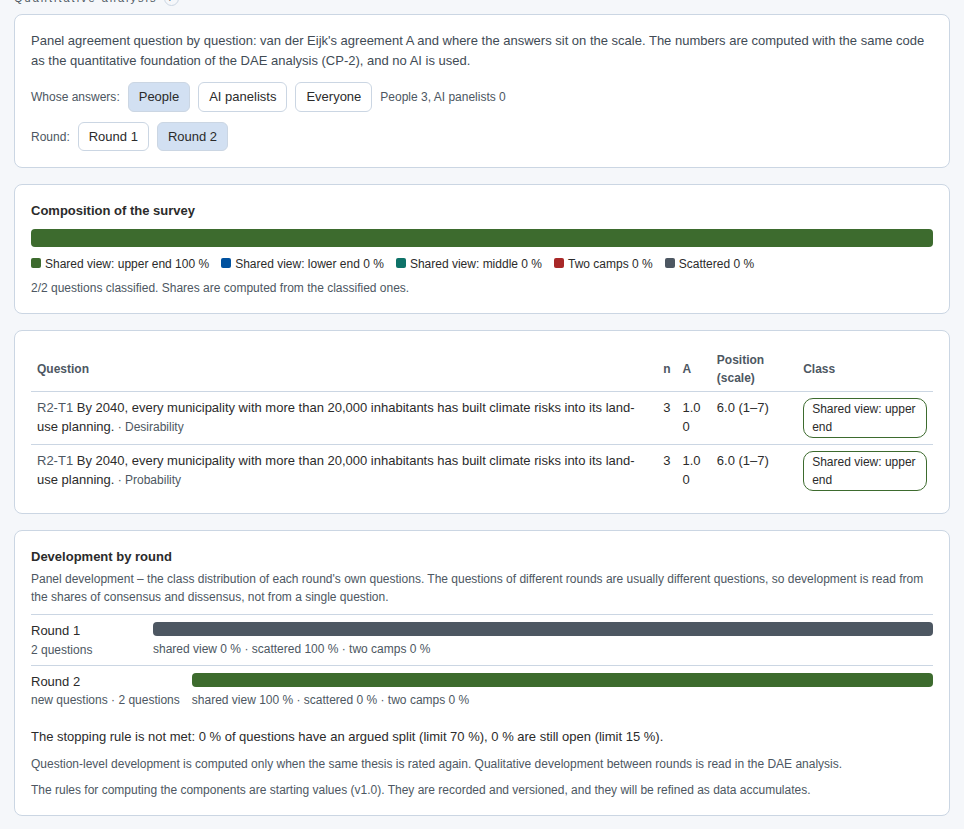
The figures tell you what is in the material. What they mean for the research question is a matter of interpretation.
4. The descriptive results report
Open Reporting › Reports. Generate results report compiles a descriptive report of the panel's responses: a summary and the spread by thesis. The report can be viewed in the browser and printed to PDF, and Download Word (.docx) gives it as an editable file.
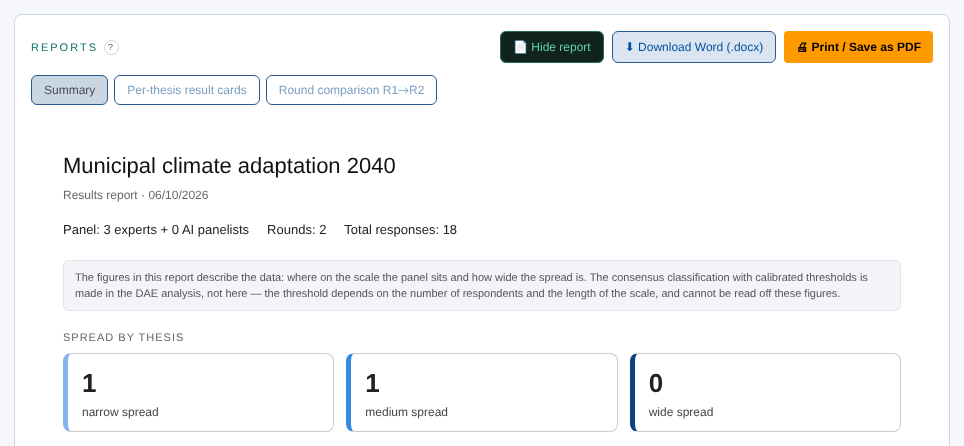
The report is source material, not an analysis. The same report can be shown to the panel together with the closing letter (previous guide).
5. Export to DAE analysis
Open Reporting › Export. The list Reporting — what remains at the top of the page tells you what is still missing for completing the study: readable material, the handover to DAE analysis, the results report, the closing letter and ending the study.
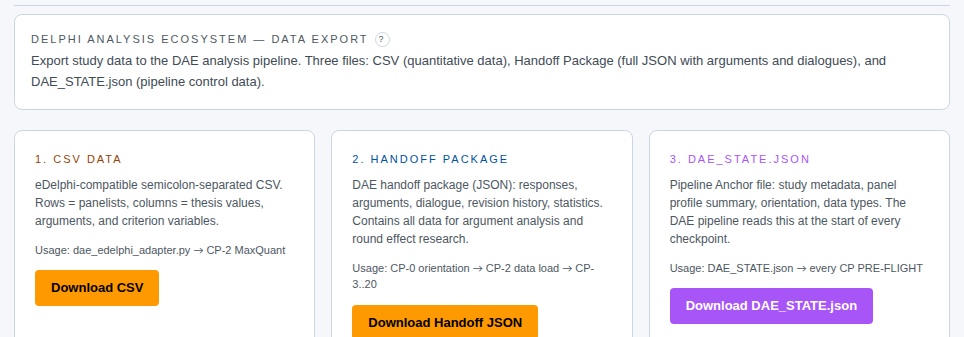
The export gives three files:
- Download CSV: the quantitative material as a table, one row per panelist.
- Download Handoff JSON: the whole material with justifications, dialogues and changes of position. This is the actual input of the DAE analysis.
- Download DAE_STATE.json: the control data of the analysis pipeline, such as the study's metadata, the panel profile and the orientation.
If the study has been ended, the handover is final. An export made before ending is an interim handover, and you can make one, for example, between rounds.
The bridge to DAE analysis
DAE analysis is an analysis pipeline that uses AI and is run in Cowork. Save the three files in the same folder. Then open a new Cowork conversation, type metodix and choose DAE analysis from the start menu. Attach the Handoff package. The pipeline proceeds checkpoint by checkpoint: the quantitative foundation, content analyses (dialogue, arguments, discourse), system analyses, the futures phase, synthesis, scenarios and reports. The qualitative development between rounds, that is, how the questions and justifications changed from round to round, is read right there.
Other variations
Classic Delphi seeks a shared view. Read above all Convergence and Quantitative analysis's lead indicator (the consensus indicator) if the same theses have been rated in several rounds.
Real-Time Delphi is a single round. No round comparison is made; instead Quantitative analysis reads from the timeline whether the responses have settled.
Barometer Delphi compares waves. Quantitative analysis shows what has changed from wave to wave and what has stayed.
Remember
- Pronoia describes, DAE interprets. Pronoia's figures are the result of rules, not interpretation.
- The questions of different rounds are usually different questions. Development is followed as shares of consensus and dissensus and qualitatively in DAE, not thesis by thesis.
- Export the material after ending the study, so that DAE gets the final handover.
- The whole process in more detail: The facilitator's process, from planning to handover.